Bestseller
HR & People
Org Chart Pro
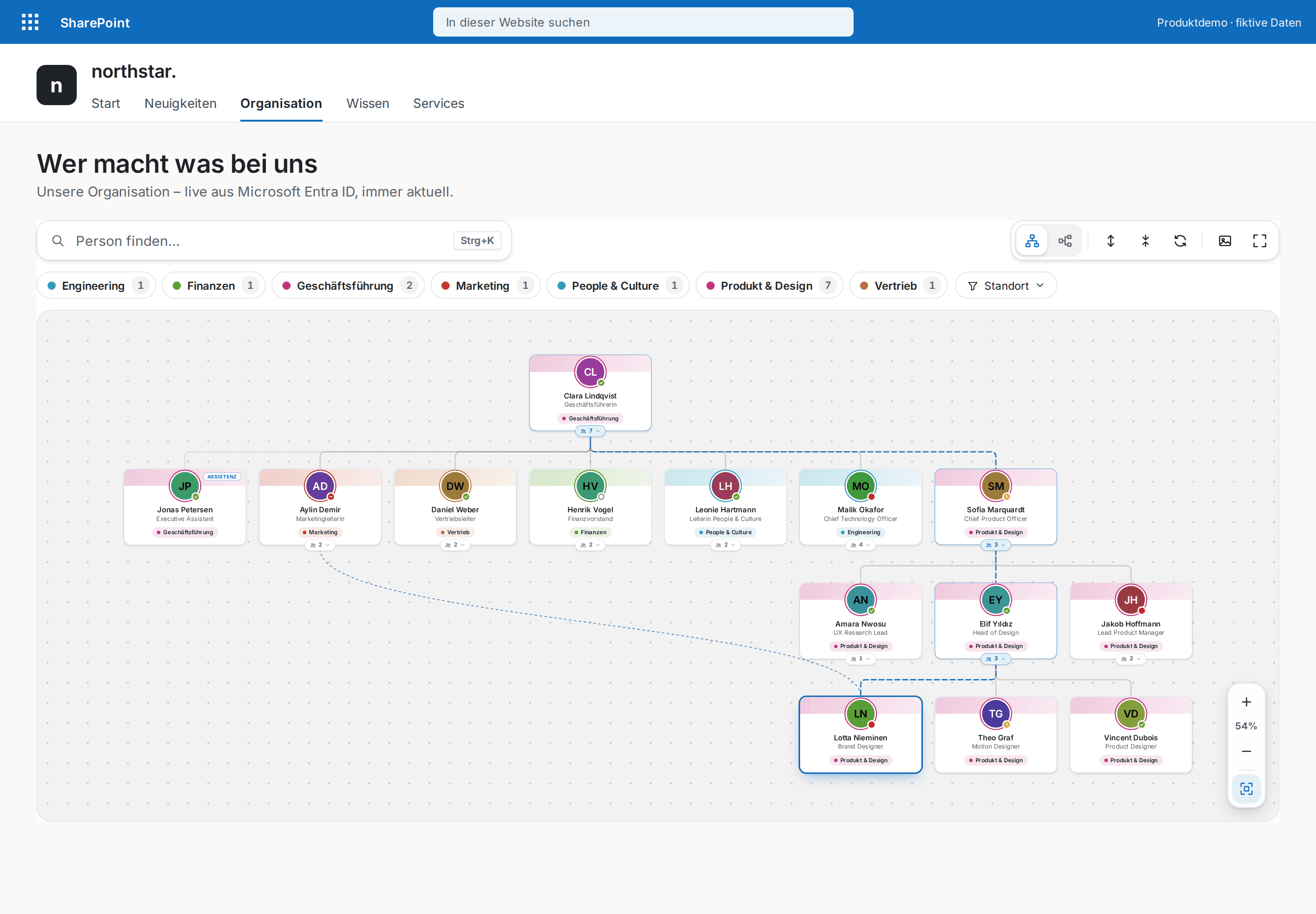
The modern org chart straight from Microsoft Entra ID — always current, zero maintenance.
€1,290
B2B store: sales exclusively to businesses, public-law entities and special funds under public law. Prices are net plus applicable taxes.
HR & People
NewEmployee recognition inside your SharePoint intranet — a kudos wall with company values, applause and highlights, no extra tool and no API permissions.
Kudos & Recognition Pro brings peer-to-peer recognition to where your people already are: the SharePoint home page, a team site or the people portal. Colleagues say thank you with a short message and exactly one company value, everyone can applaud, and highlights show who was recognized most in the period and which values are being lived right now. A recognition tool without an extra login, per-user licence or external platform.
Giving kudos takes seconds: search a person (SharePoint people picker, up to five recipients), choose a value, write the message, check the preview, send — with confetti if you like. Every card names recipients, value, message, giver and time; applause is a toggle with a counter, authors can delete their own kudos and site owners moderate right on the wall. Period chips (week, month, quarter, year, all time), a value filter, “received / given” and a search across people and messages keep even large walls readable.
New in version 1.1: a summary shows the period's kudos, people recognized, people saying thanks and applause. Clicking a person in the highlights filters the wall to their kudos; active filters appear as chips above the wall and can be cleared one by one or all at once. People with Full Control or Design on the kudos list can remove inappropriate posts. Organizations that prefer not to rank people can switch “Most recognized” off. The wall reads large lists with more than 5,000 items reliably.
Authors configure everything in the property pane: up to twelve company values with label, icon and description in a table editor (six neutral bilingual suggestions are preset), Wall, Feed or Spotlight layout, columns, default period, highlights, applause, profile photos, maximum recipients and message length. The two lists “Kudos” and “KudosApplause” are created in the current site with one click — with item-level permissions “read all, edit own”.
The wall follows light and dark SharePoint sections with Theme, Soft and Compact skins, is accessible (keyboard, focus, icon plus text, reduced motion) and localized in English and German. It reads and writes exclusively through SharePoint REST under the signed-in user's permissions: no Microsoft Graph or other API approval, no external service, no telemetry. Your recognition data stays in your own lists and your own governance. Kudos & Recognition Pro is developed and published by Lyron.
This is a ready-made SPFx web part for SharePoint Online. What SPFx web parts are · Install the .sppkg · All web parts · Tenant licensing and updates · Compare SharePoint HR web parts
| Version | 1.1.0 |
|---|---|
| Last updated | Sep 24, 2026 |
| SPFx version | ≥ 1.23.2 |
| SharePoint Online | Yes |
| Microsoft Teams | No |
| SharePoint on-premises | No |
In two ordinary SharePoint lists of the site that hosts the web part: “Kudos” (recipients, message, value, giver, time) and “KudosApplause” (one row per person and kudos). The web part creates both with one click in the property pane; the titles are configurable. Retention, export and deletion therefore follow your SharePoint governance, and reporting works with list views or an Excel export.
Everyone with contribute rights on the lists (usually site members) can give kudos and applaud. Provisioning sets item-level permissions: everyone reads everything, each person edits or deletes only their own entries. People with Full Control or Design on the kudos list (usually site owners) can additionally remove any kudos from the wall; this moderation can be switched off. Visitors with read-only access see the wall but cannot post. Self-recognition is blocked in the form and checked again against the site user when sending.
No. The web part uses SharePoint REST exclusively, under the signed-in user's permissions: people search through the site's SharePoint people picker, profile photos through the site's photo endpoint, reads and writes in the two lists. It requests no Microsoft Graph or other API permission, uses no external service and contains no telemetry.
Yes. In the property pane you maintain up to twelve values with label, icon (twelve icons to choose from) and an optional description in a table editor, sortable by drag and drop. Six neutral suggestions (Teamwork, Customer focus, Innovation, Ownership, Helping hand, Quality) are preset in the page language. Every value gets a stable key, so existing kudos survive a rename.
From the kudos of the selected period: a summary counts kudos, people recognized, people saying thanks and applause; “Most recognized” counts kudos per recipient (3–6 people with bars and the values they received) and can be switched off if your organization prefers no ranking; “Values in action” counts kudos per value. People and values are clickable and filter the wall. Kudos are read newest first up to a configurable limit (100–2,000, default 500); when it is reached, a notice says so.
Yes. Colours come from the SharePoint theme and the section (light or dark); Theme, Soft and Compact skins change shape, density and elevation, and an optional accent colour highlights buttons and badges. Wall, Feed and Spotlight layouts cover home pages, side columns and campaign pages. On narrow views the wall becomes a single column and filter chips scroll.
On modern SharePoint Online pages and in the SharePoint full-page host with SPFx 1.23.2 or newer. Microsoft Teams and SharePoint Server on-premises are not claimed for version 1.1.0.
Yes. SharePoint blocks queries on unindexed columns once a list holds more than 5,000 items. The wall therefore only queries the always-indexed ID and reads applause in small blocks through the indexed KudosId column. “Create or repair lists” also indexes the filter columns on lists that were created by hand.
Lyron is the developer and publisher. The one-time licence covers one Microsoft 365 tenant with unlimited authorised users and pages; after release, delivery uses SPFxStore’s protected licence and download flow.
HR & People
The modern org chart straight from Microsoft Entra ID — always current, zero maintenance.
HR & People
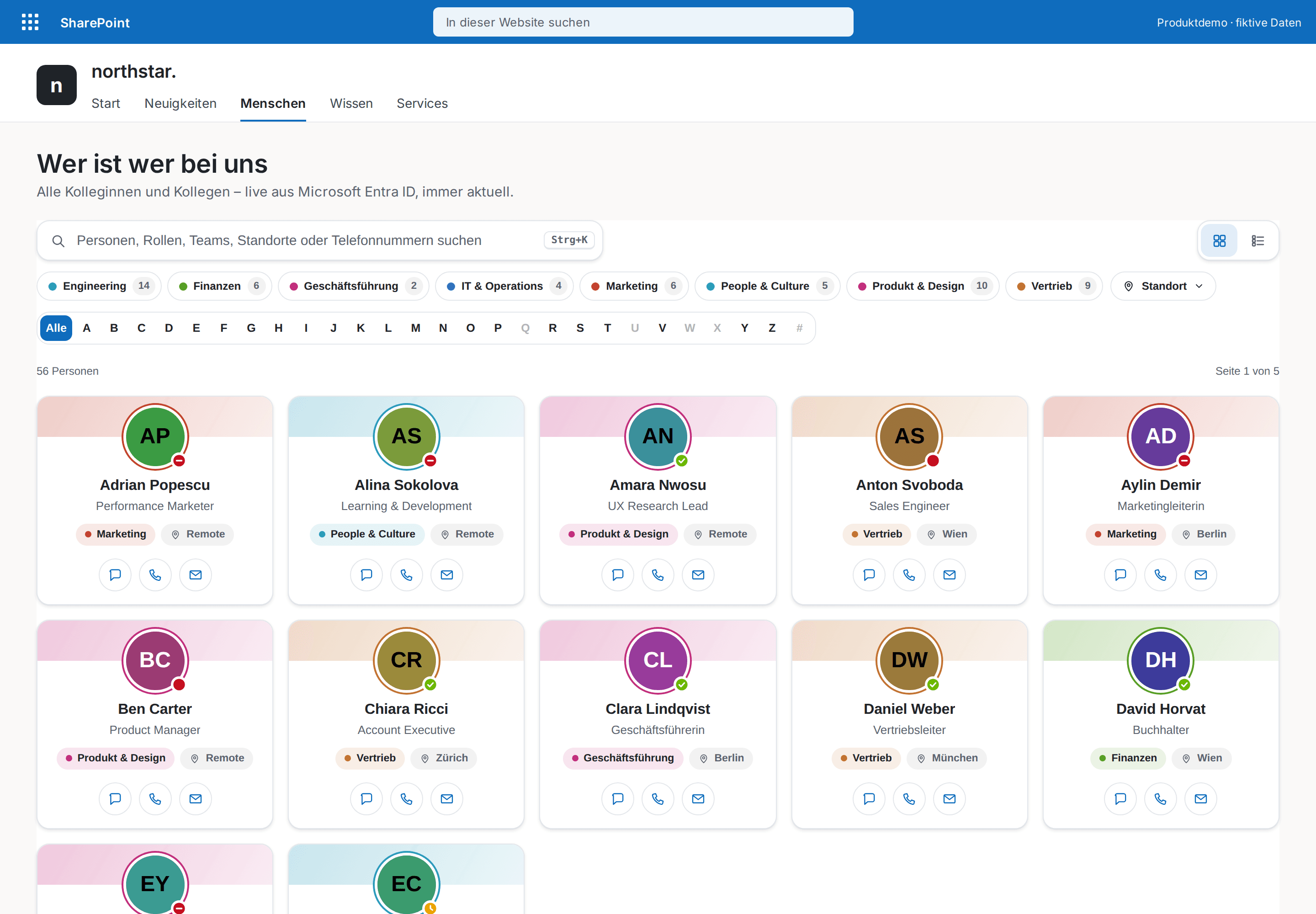
The modern who's who for your intranet — every colleague one keystroke away.
HR & People
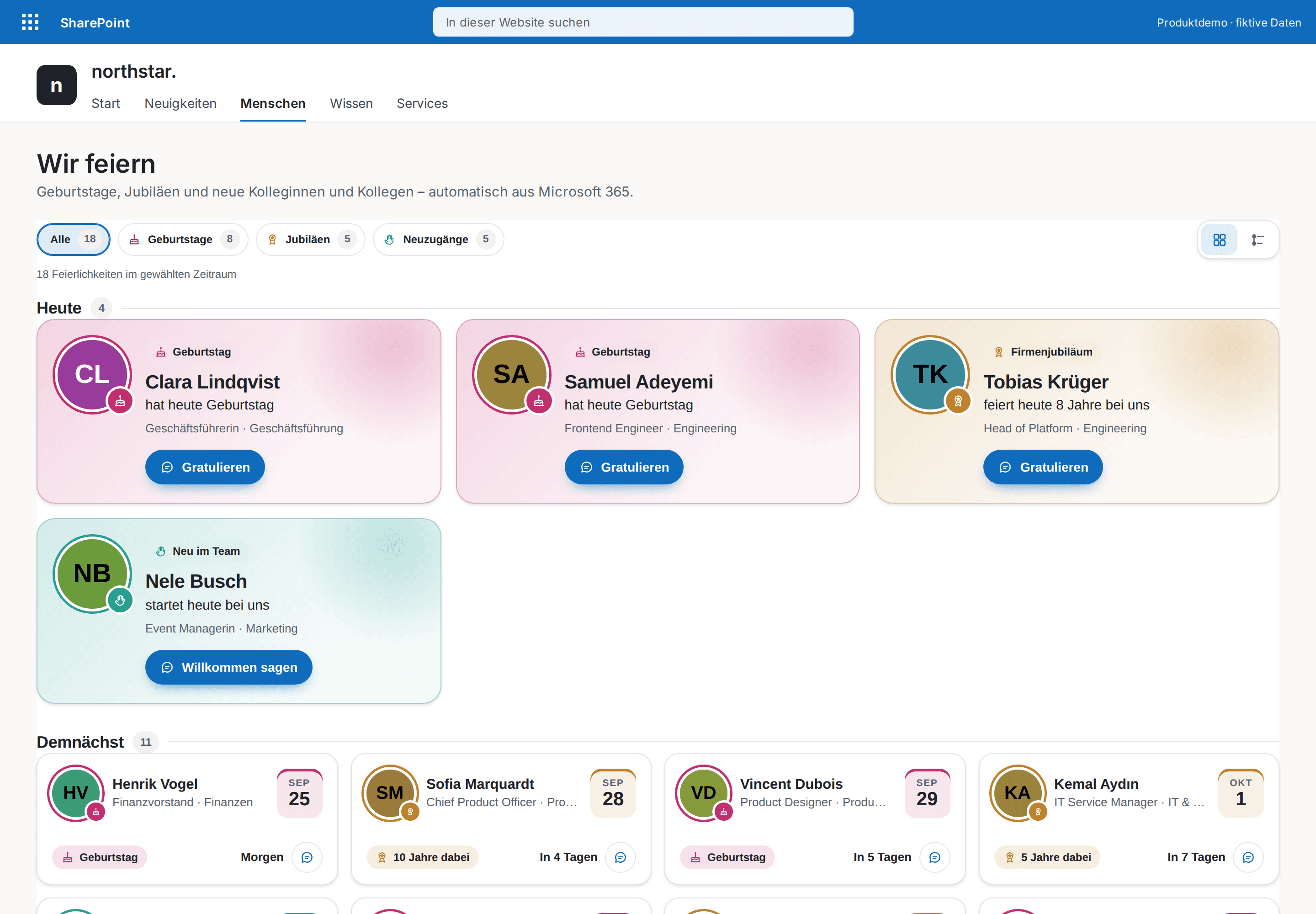
Celebrate your people automatically — birthdays, work anniversaries and new colleagues, with congratulations in Teams.