New
HR & People
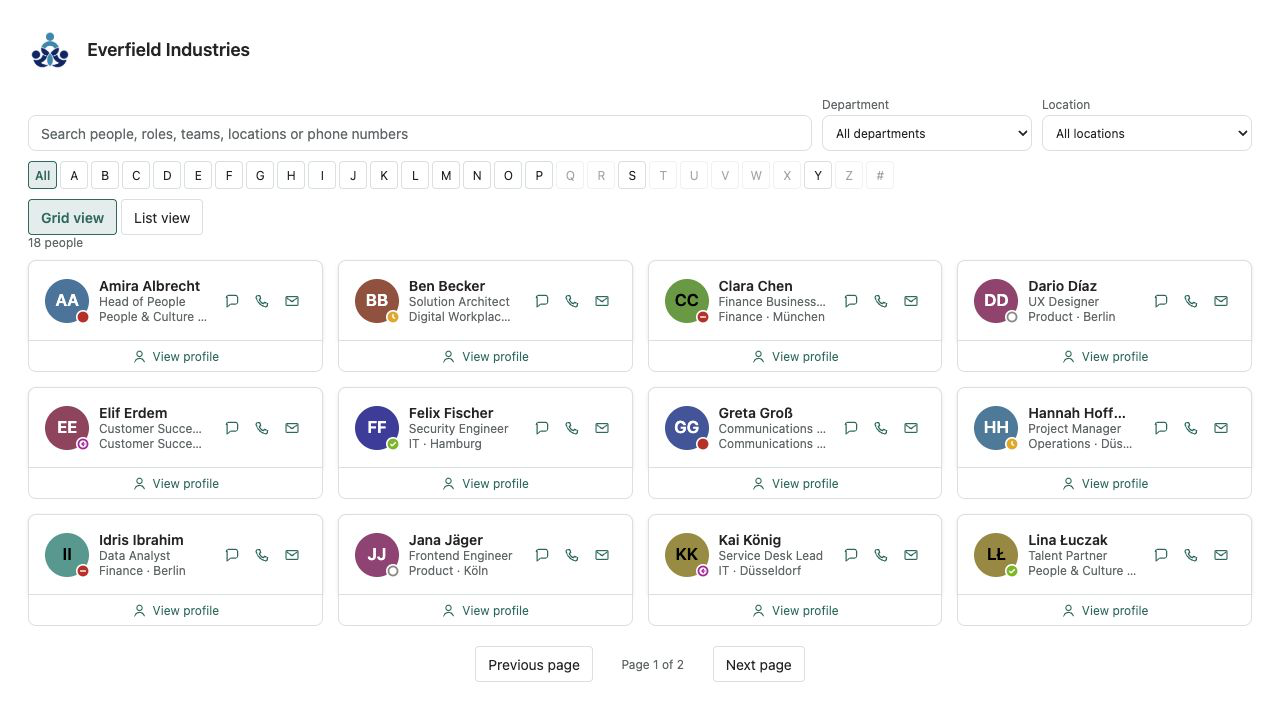
Employee Directory Plus
A fast people directory from Microsoft Entra ID — theme-aware, bilingual and free of external services.
€640then €800
B2B store: sales exclusively to businesses, public-law entities and special funds under public law. Prices are net plus applicable taxes.
HR & People
NewThe hybrid week on your SharePoint page: office, home, traveling or away — only what each person saves. No Outlook.
Who's in the Office shows the current week as a board on the SharePoint home page or a team page. Each person saves where they will be: in the office, at home, traveling or away. A summary counts the focused day, a team filter narrows the board, and a Today layout groups the same day into four lanes. A hybrid attendance plan that lives where the intranet already is — no extra tool and no per-user licence.
Only what someone explicitly saves is stored. There is no Outlook access, no Teams presence and no automatic location. A row the person saved wins over a row someone else entered for them in the list. Away here is a plan, not approved leave: that stays with Leave Planner.
Authors create the list with one click, name up to twelve teams and choose the week board or Today, the first day of the week, weekends, photos and notes. The “OfficeWeek” list lives in the current site: everyone reads, each person edits only their own items. Colours follow the SharePoint theme, light and dark, with Theme, Soft and Compact skins.
It reads and writes exclusively through SharePoint REST under the signed-in person's permissions. No Microsoft Graph or other API approval, no external service, no telemetry. Who's in the Office is developed and published by Lyron.
This is a ready-made SPFx web part for SharePoint Online. What SPFx web parts are · Install the .sppkg · All web parts
| Version | 1.0.0 |
|---|---|
| Last updated | Sep 21, 2026 |
| SPFx version | ≥ 1.23.2 |
| SharePoint Online | Yes |
| Microsoft Teams | No |
| SharePoint on-premises | No |
No. The only thing visible is what people save in this web part or directly in the SharePoint list. There is no mailbox access, no Teams presence and no location detection. That is also why it needs no API approval.
In an ordinary SharePoint list of the site that hosts the web part. The suggested title is “OfficeWeek” and can be changed. One row per person and week: person, week start, team, one place per weekday and an optional note. Retention, export and deletion follow your SharePoint governance.
In the web part each person saves only their own week. The list is created so that everyone can read and members edit only their own items. People with full control can still change any row in SharePoint; once the person saves their own week, the board shows that row.
No. There is no request, no approval and no balance. “Away” is what the person says for this week, not approved leave. Requests, the manager and entitlements belong to Leave Planner. Both can sit on the same intranet page; they do not share data.
The four places are fixed so every intranet reads the same way: office, home, traveling, away. Teams are yours: up to twelve labels in the property pane, with three neutral suggestions in the page language the first time you open it. Renaming a label keeps existing plans attached.
No. The web part uses only SharePoint REST under the signed-in person's permissions. Profile photos, if you leave them on, come from the site's photo endpoint and can be switched off. It requests no API permission and contains no telemetry.
On modern SharePoint Online pages and in the SharePoint full-page host with SPFx 1.23.2 or newer. Microsoft Teams and SharePoint Server on-premises are not claimed for version 1.0.0.
Lyron is the developer and publisher. The one-time licence covers one Microsoft 365 tenant with unlimited authorised users and pages. The price is 490 euros net. Delivery uses SPFxStore’s protected licence and download flow.